
Overview
Absence Management is an application in PeopleSoft HRMS suit which enables organizations to automate the processes for planning and compensating paid time off (Annual/Sick/Casual/Parental/ Leave etc...) for the employees.It provides various Self-Service pages for both employees and managers to raise and approve the absence requests respectively. Admins can also raise the requests on behalf of staffs and administer them through dedicated pages.

Elements of Absence Management
There are various elements used in Absence Management that combined to form the entire architecture of the Absence system.Absence Event - The period for which an employee is absence for the same reason for example, an employee is on Annual Leave for 1 week then this 1 week absence is the event.
Absence Take - The element which represent the reason for Absence Event. In above example, Annual Leave will be the Absence Take.
Entitlement - The amount of paid time off an employee is entitled to take for an Absence Take.
Entitlement Balance - The amount of unused entitlement
Adjustment - A deduction or addition made from/into the Absence Entitlement balance.
Units - The period of time in which entitlement, take, adjustments, balances, and other absence-related time periods are measured. Typically, units represent either hours or days
Key Concepts in Absence
Management
Triggers
You can create triggers in Absence
Management to detect changes made to data in Human Resources. This enables
Absence Management to identify payees automatically who needs to be
recalculated during an absence run.
Iterative Trigger
An iterative
trigger tells the system to process (or reprocess) a
payee in the current open calendar, possibly because payee data has changed or
the payee was terminated or payee has raised another absence request
during the same calendar period.
PeopleSoft HRMS Online Training
PeopleSoft HRMS Online Training
Retro Trigger
A retroactive (or retro)
trigger tells the system to reprocess previously calculated (closed) calendars.
Example:
An employee has raised an absence request for
the month of Oct which is a past dated absence request. This absence request
will be detected Retro Trigger and processed.
Segmentation Trigger
This trigger tells the
system to process a payee’s absence when a data change occur in the middle of
the pay period, by dividing the pay period in two segments for the correct
result.
Example:
A person gets promoted
to a higher grade on 17th of the current month and now they are
eligible for more number of leaves hence, Segmentation trigger will detect this
change and two segments will be created for this pay period 1) 1st
to 16th and another from 17th to 31st of the
month
Retro Processing Methods
Retro is a term used in Absence when the absence is
recalculated for the already closed calendars.
Corrective
Retro Processing
This method recalculates
all the past dated absences from the month in which the retro even has occurred
and update the accumulator for each month with re-calculated results.
Example:
This is the absence data
for an employee as on Month of March which is current month.
Jan Entitlement = 1
Jan take = 0
Jan balance = 1
Feb Entitlement = 2
Feb take = 0
Feb balance = 2
March Entitlement = 3
Jan take = 1
March balance = 2
Jan take = 0
Jan balance = 1
Feb Entitlement = 2
Feb take = 0
Feb balance = 2
March Entitlement = 3
Jan take = 1
March balance = 2
Now, the employee raises
an absence request for the month of January so this is how the absence data
will look like when this request is processed through corrective method.
Jan Entitlement = 1
Jan take = 1 - recalculated
Jan balance = 0 recalculated
Feb Entitlement = 2
Feb take = 1 recalculated
Feb balance = 1 recalculated
March Entitlement = 3
Mar take = 1 recalculated
March balance = 2 recalculated
How Absences are Processed in PeopleSoft Absence Management System
Visit this page to know more on this - How Absences are Processed in PeopleSoft Absence Management SystemSetting Up Absence Management
Here is what you all need to do in sequence to set up Absence ManagementSecurity Setup
This is the first thing we do when we start the Global Payroll and Absence Management set up. There are two types of security setup for Global Payroll and Absence ManagementElement-level security (Set Up HRMS, Security, User Maintenance, Global Payroll User Profile, User Rules Profile )
- Restricts the elements that a user can view or update, based on the User Rules Profile page and the Used By, Owner, and Override Levels fields on the Element Name page.
Payee-level security (Set Up HRMS, Product Related, Global Payroll & Absence Mgmt, Elements
- All Element Definition Components)
- Restricts the payees that a user can view, based on the standard HR security in PeopleSoft Enterprise Human Resources.
Setting Up Absences
There are broadly areas from where the setup is done:- System Setting
- Elements
- Framework
- Schedules
- Triggers
System Setting
This is where the setup begins. In this area some installation and schedule settings are done along with countries setup like what will be the default retroactive method that should be used in absence processing etc...Elements
Primary Elements - Absence Take and Absence EntitlementsSupporting Elements - Accumulators, Formula, Variable, Bracket, Array etc...
below diagrams shows in what order the elements are created:

Navigation: Set Up HRMS – Product Related – Global Payroll &
Absence Mgmt – Elements
Generation Controls
If we want to have
a control on the element that during absence processing, it should be resolved
only when it meets certain criteria then we use generation control elements.
Generation control
works as a switch for another element to be resolved, if the switch is on then
the element will be resolved, if switch is off then it won’t.
Scenarios where
Generation Control element is used:
If an employee is
on Leave of Absence (LOA) then the annual leave entitlement shouldn’t be given
to them in which case we can create a Generation Control element which will
find out whether an employee is on LOA and based on that it can decide whether
the Annual Leave Entitlement element should be resolved or not.
Framework
Once the elements have been defined, the framework for processing various absences is setup. Below snapshot is showing the order in which this setup has to be done:
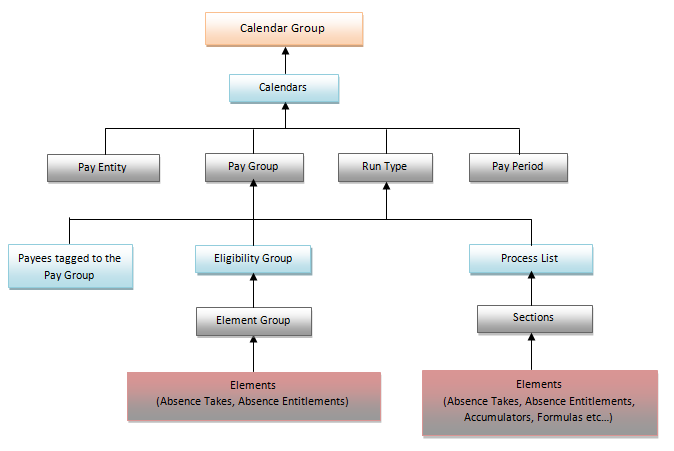
Navigation: Set Up HRMS – Product Related – Global Payroll &
Absence Mgmt – Framework
Schedules
Schedules define workplace attendance
expectations for groups of employees, and include definition of
The workdays, scheduling units, and
holidays. This information is important to the absence process because it tells
the system whether a reported absence occurred during a scheduled work time.
Absences during
Scheduled work periods may be paid if they meet your
organization's absence rules.
Navigation: Set Up HRMS – Product Related – Global Payroll &
Absence Mgmt – Schedules
Triggers
We Setup various triggers to detect
changes occurred in the absence/employee’s data so that that they can be
processed during Absence Run.
Navigation: Set Up HRMS – Product Related – Global Payroll &
Absence Mgmt – Triggers
Self
Service Setups
We configure the absence take elements for Self-Self
service users as to how the page will look like, whether forecasting to be
used, what will be the error message to be thrown when employee is not eligible
for leave, what are all the fields to display in absence request page etc…
Navigation: Set Up HRMS – Product Related – Global Payroll &
Absence Mgmt – Absence Management
PeopleSoft HRMS Online Training
PeopleSoft HRMS Online Training

